
Google Hotels Scraper
Scrape Google Hotels at scale: hotel discovery, live per-night prices, and the full OTA price ladder - every booking source Google shows (Booking.com, Agoda, Expedia, Hotels.com, Priceline, Trip.com, KAYAK…) with its rate and a direct booking link, plus per-room rates, star class, guest ratings, and optional reviews with exact publish dates and owner responses. One row per hotel - no row-explosion.
What you get
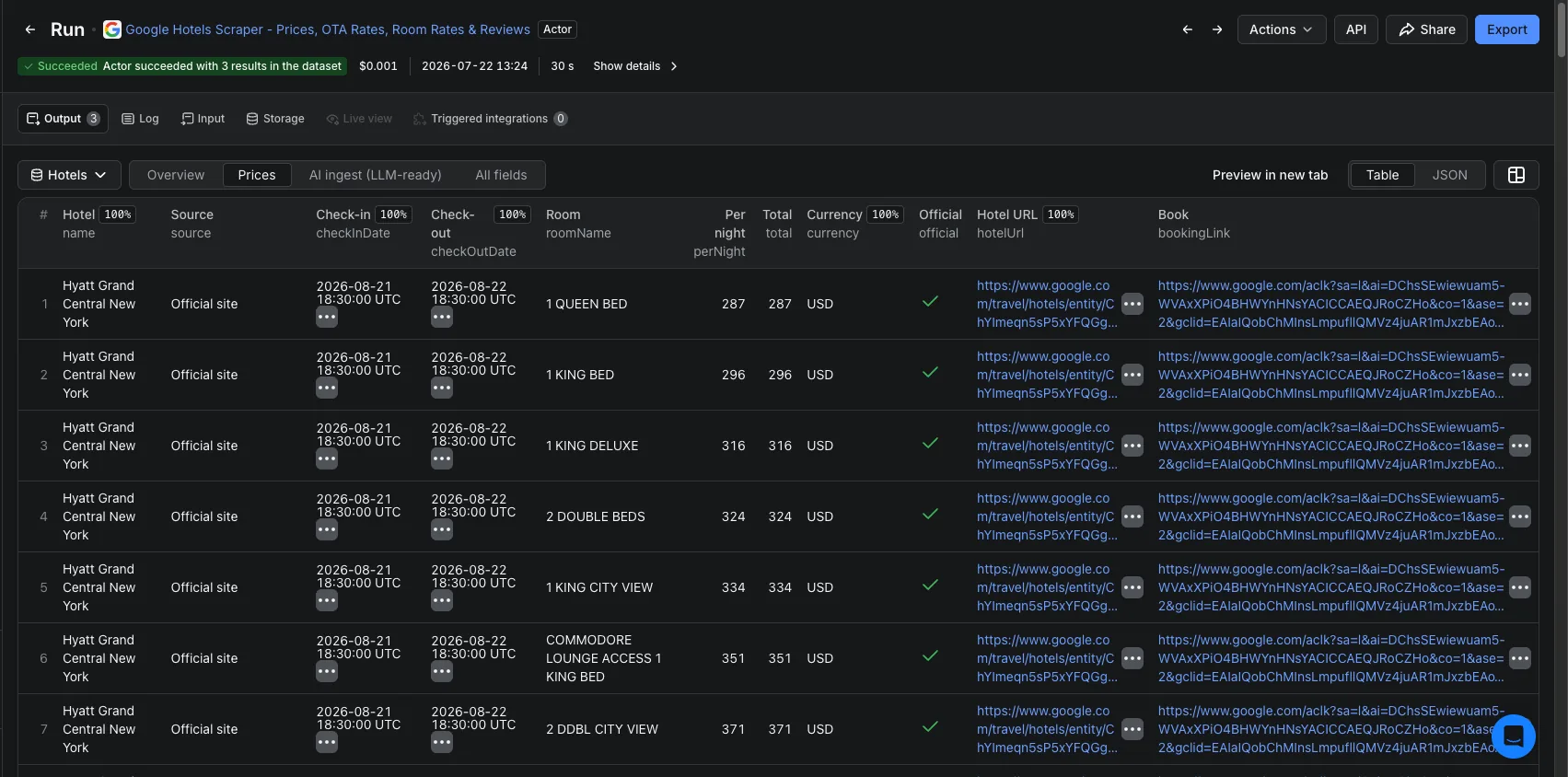
One row per hotel, with all prices nested on the row so you never explode a property into dozens of rows:
- The priced offers table in
offers[]- one self-contained row per booking source × stay-date × room (when the source exposes room rates):source,checkInDate/checkOutDate,roomName,perNight,total,currency, a booking link, and anofficialflag. The hotel's own direct-booking row is labelled Official site. Every source Google shows (typically 15–25) is here. - A booking-source directory in
vendors[]- one entry per source with its booking link and official flag: the quick list of who sells the hotel (the prices themselves live inoffers[]). - Headline price -
leadPrice/leadPriceTotalandvendorCountfor at-a-glance comparison. - Multi-date price window - set Track prices until and every check-in day up to 60 days ahead is repriced and appended to
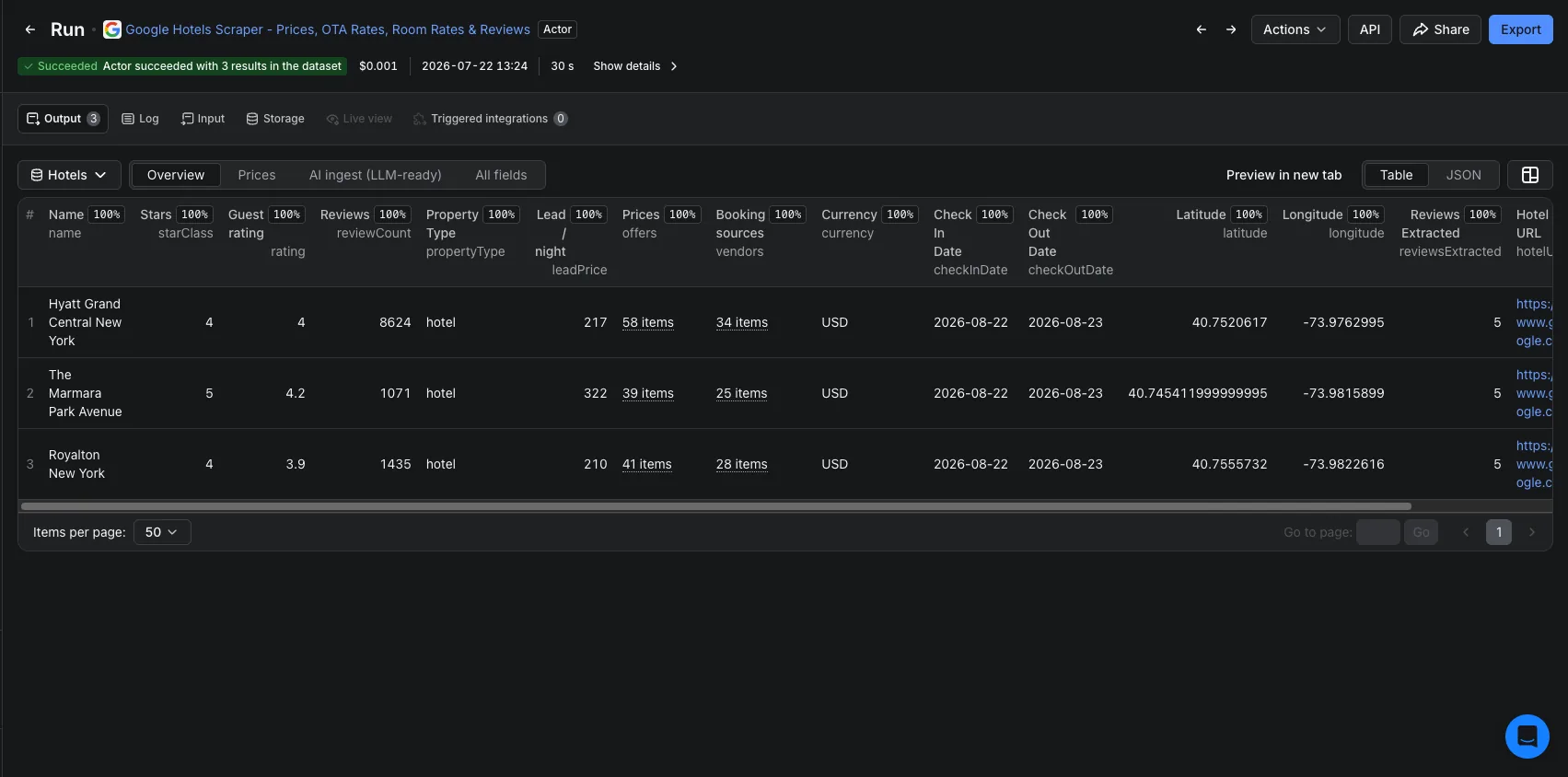
offers[]with its own dates. - Discovery & property fields - name, star class, guest rating, review count, property type, coordinates, Google entity token and Maps CID, and the Google Hotels deep link.
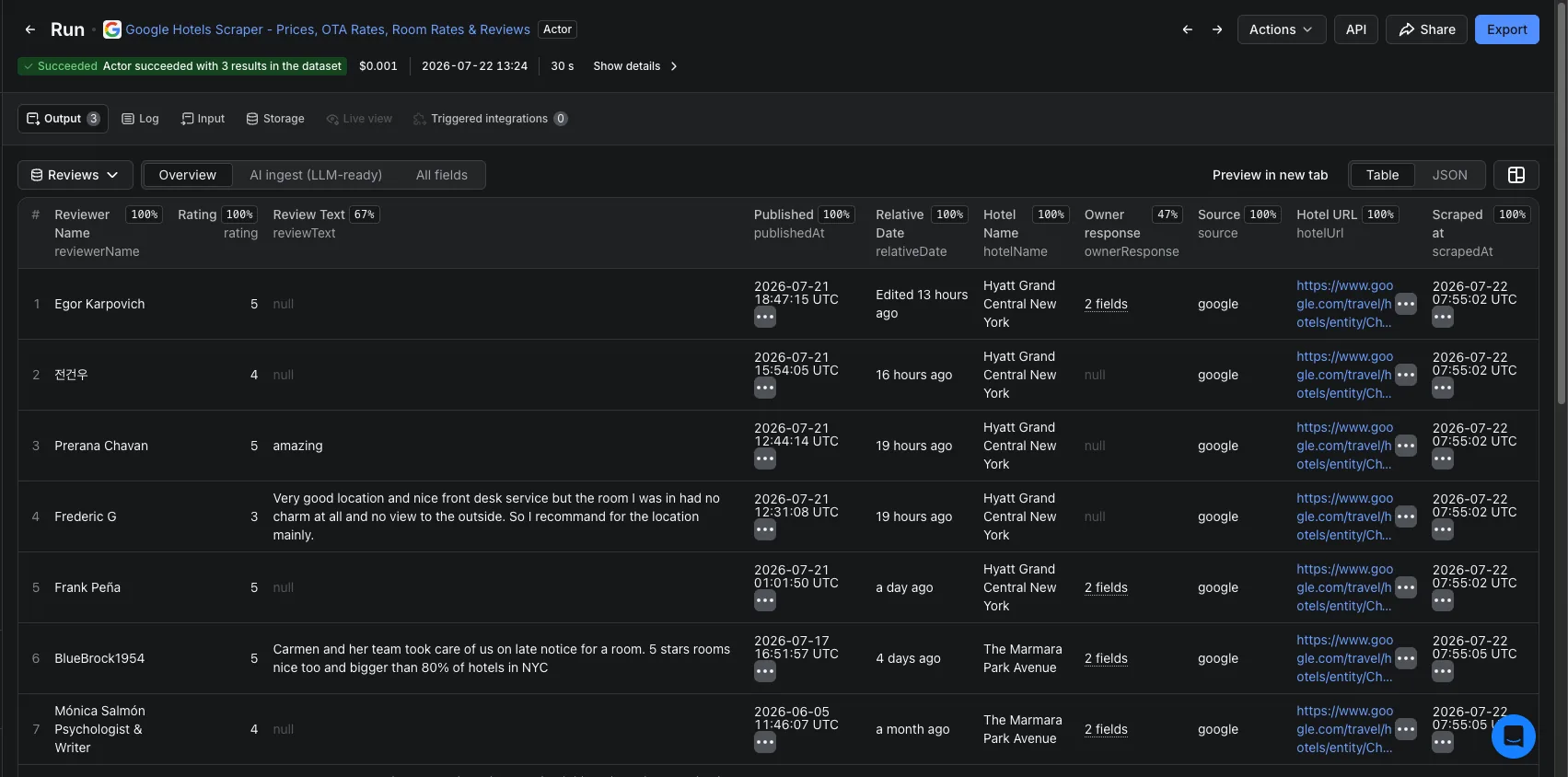
- Reviews (optional) - one row per guest review with reviewer, rating, review text, exact publish date, and the hotel's owner response.
- LLM-ready markdown - a self-contained
markdownContentblock on every hotel and review row, ready to drop into a vector DB or RAG pipeline.
The OTA price ladder, on one row
A single run of hotels in New York City returns each hotel with its complete source ladder. Real sample output (2 hotels, one night):
| Hotel | Class | Guest rating | From / night | Booking sources | Cheapest source |
|---|---|---|---|---|---|
| The Manhattan at Times Square Hotel | 4★ | 3.0 (10,129) | $195 | 17 | Super.com $195 |
| New York Hilton Midtown | 4★ | 4.0 (12,020) | $235 | 24 | Super.com $235 |
For the Hilton, the ladder spans Expedia $302, Booking.com $308, Priceline $308, Agoda $308, Hotels.com $302, Trip.com $302 and a dozen more - each nested on the one hotel row, with the official-site rate flagged. Grab the full sample CSV to see all 37 source-price rows.
Sample output
One hotel row (trimmed). Download results as JSON, CSV, Excel, or HTML:
{
  "name": "The Manhattan at Times Square Hotel",
  "starClass": 4, "rating": 3.0, "reviewCount": 10129,
  "propertyType": "hotel", "latitude": 40.7623, "longitude": -73.9826,
  "checkInDate": "2026-08-15", "checkOutDate": "2026-08-16", "nights": 1,
  "currency": "USD", "leadPrice": 195, "leadPriceTotal": 195, "vendorCount": 17,
  "offers": [
    { "source": "Super.com",    "perNight": 195, "total": 195, "roomName": null,            "official": false, "bookingLink": "https://www.google.com/aclk?..." },
    { "source": "Booking.com",   "perNight": 290, "total": 290, "roomName": null,            "official": false, "bookingLink": "https://www.google.com/aclk?..." },
    { "source": "Expedia.com",   "perNight": 292, "total": 292, "roomName": null,            "official": false, "bookingLink": "https://www.google.com/aclk?..." },
    { "source": "Official site", "perNight": 308, "total": 308, "roomName": "Standard room", "official": true,  "bookingLink": "https://www.google.com/aclk?..." }
  ],
  "vendors": [ { "source": "Super.com", "bookingLink": "https://www.google.com/aclk?...", "official": false } ],
  "hotelUrl": "https://www.google.com/travel/hotels/entity/ChkI...",
  "entityToken": "ChkIooCAqvyy0fDgARoML2cvMWhoZ18zbWdzEAE",
  "markdownContent": "# The Manhattan at Times Square Hotel (Google Hotels) ..."
}Output fields
Two datasets: Hotels (one row per hotel, prices nested) and Reviews (one row per guest review). Full dictionary in the GitHub docs.
| Hotels field | Type | What it is |
|---|---|---|
name | string | Hotel name. |
starClass / rating / reviewCount | number | Hotel-class stars (1–5), average guest score (/5), and total review count. |
propertyType | string | hotel, resort, apartment, vacation rental… |
latitude / longitude | number | Coordinates. |
checkInDate / checkOutDate / nights | string / int | Stay the prices are for. |
currency | string | Currency of all prices in the row. |
leadPrice / leadPriceTotal | number | Cheapest per-night and total across all sources. |
vendorCount | integer | How many booking sources sell the hotel. |
offers | array | The prices table - see below. |
vendors | array | Booking-source directory {source, bookingLink, official} (no prices). |
hotelUrl / entityToken / cid | string | Google Hotels deep link + stable IDs. |
markdownContent | string | LLM-ready summary block for RAG. |
offers[] row | Type | What it is |
|---|---|---|
source | string | Booking source (Booking.com, Agoda…); the hotel's own row is Official site. |
checkInDate / checkOutDate | string | The stay dates this priced row is for (base stay or a price-window date). |
roomName | string \| null | Room type, when the source exposes per-room rates. |
perNight / total / currency | number / string | Per-night price, whole-stay total, and currency. |
official | boolean | true only for the hotel's direct-booking row. |
bookingLink | string | Deep link to book on this source. |
| Reviews field | Type | What it is |
|---|---|---|
reviewerName / rating / ratingMax | string / number | Reviewer and their score (typically out of 5). |
reviewText | string | Review body (empty for rating-only reviews). |
publishedAt | string | Exact review date (ISO-8601), decoded from Google's timestamp. |
relativeDate | string | As Google shows it, e.g. 2 months ago. |
ownerResponse | object | The hotel's reply {text, date}, when present. |
hotelName / hotelUrl / entityToken | string | Hotel context merged onto every review row. |
markdownContent | string | LLM-ready per-review block for RAG. |
Why this scraper
- The whole ladder, not just one price - most Google Hotels scrapers hand you a single "from" price. This one returns every source Google shows, so you can see rate parity and the real cheapest channel at a glance.
- Prices + reviews + discovery in one actor - paginate a destination search, price the full ladder, and pull reviews (with exact dates and owner responses) from the same run.
- Cost-aware, toggle-able - pay per hotel, plus a small charge per priced date and per review; switch prices or reviews off to run discovery-only and cheaper.
- Flexible entry - a destination search and/or specific hotels by name, a Google Hotels/Maps link, a
maps.app.goo.glshort link, aChIJplace-id or aChkIentity token.
Who it's for
- Revenue managers & rate shoppers - monitor your own and competitors' rates and parity across every booking source, across dates.
- OTAs & metasearch builders - discovery plus the full priced ladder with booking links for a destination.
- Market & travel researchers - map every hotel in a destination with star class, ratings and price bands.
- AI agents & RAG pipelines - a clean, blind-fillable schema and a
markdownContentblock on every row; callable by AI agents through Apify's API and MCP integration.
How it compares
An alternative to enterprise rate-shopping suites and to piecing together official APIs - on pay-per-use pricing, with the raw data you own.
| This scraper | Enterprise rate tools | Official Google / OTA APIs | |
|---|---|---|---|
| Pricing model | Pay-per-use, no license | Annual seat license | Limited / no public price API |
| Full OTA price ladder | ✓ every source Google shows | ✓ | ✗ |
| Per-room rates | ✓ where the source exposes them | Partial | ✗ |
| Multi-date / forward windows | ✓ up to 60 days ahead | ✓ | ✗ |
| Guest reviews included | ✓ exact dates + owner replies | ✗ | ✗ |
| Raw data you own & pipe anywhere | ✓ JSON/CSV/API | Dashboard-locked | Varies |
| API / AI-agent (MCP) access | ✓ | Limited | Varies |
| Setup | None - runs on Apify | Onboarding + contract | Dev integration |
How much does it cost?
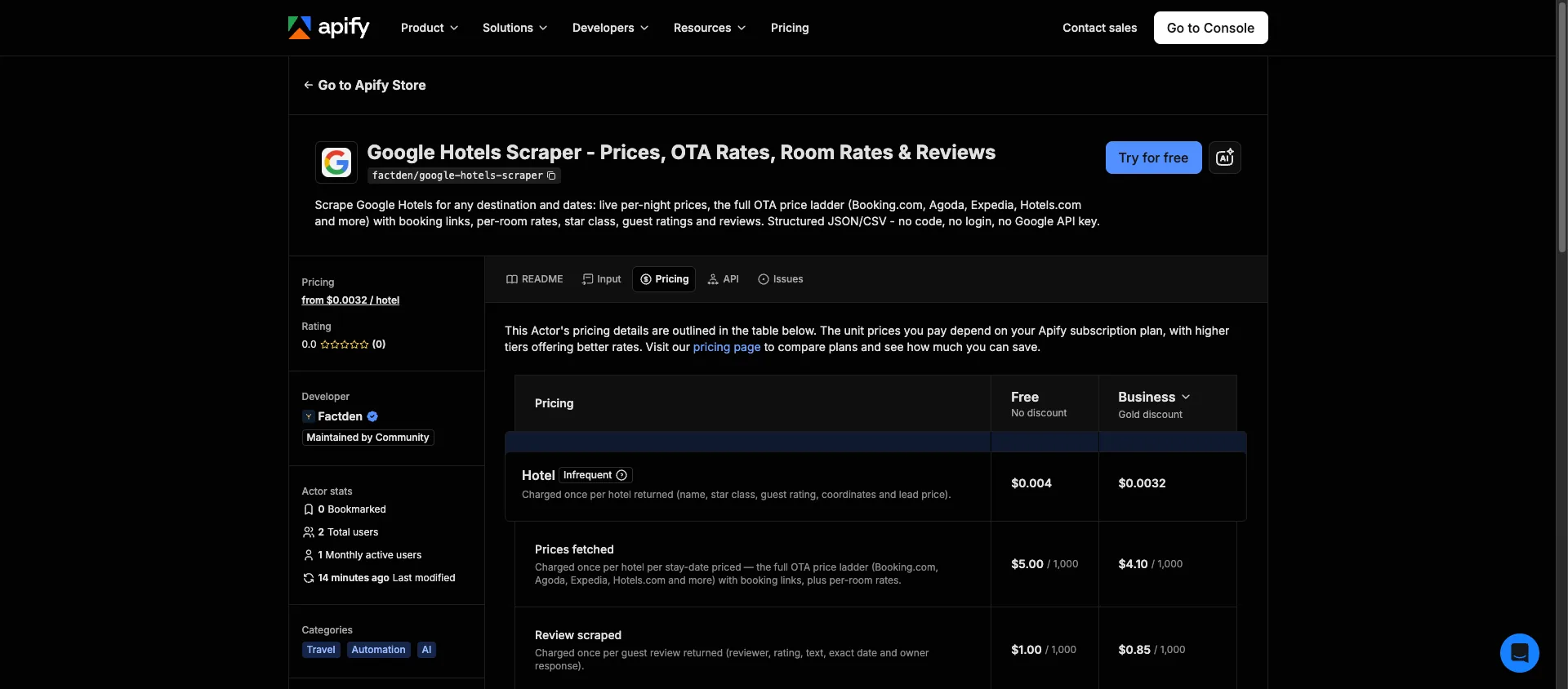
Pay only for what you pull - no start fee. Three events: Hotel $0.004 (each hotel returned), Prices $0.005 (each hotel priced - the full OTA ladder plus per-room rates, per date), and Review $0.001 (each review). So a hotel with its full price ladder is $0.009; discovery-only is $0.004. New Apify accounts get $5 in free credit (~555 fully-priced hotels, or ~1,250 discovery-only), and paid plans get a lower per-event rate. See the actor page for current pricing.
Worked examples:
- Price 20 hotels once (full ladder + rooms) - 20 × $0.009 = $0.18.
- Monitor a 50-hotel comp set across 30 check-in dates - 50 × $0.004 + 50 × 30 × $0.005 = ~$7.70 per sweep.
- Discovery-only sweep of 500 hotels (no prices) - 500 × $0.004 = $2.00.
How it works
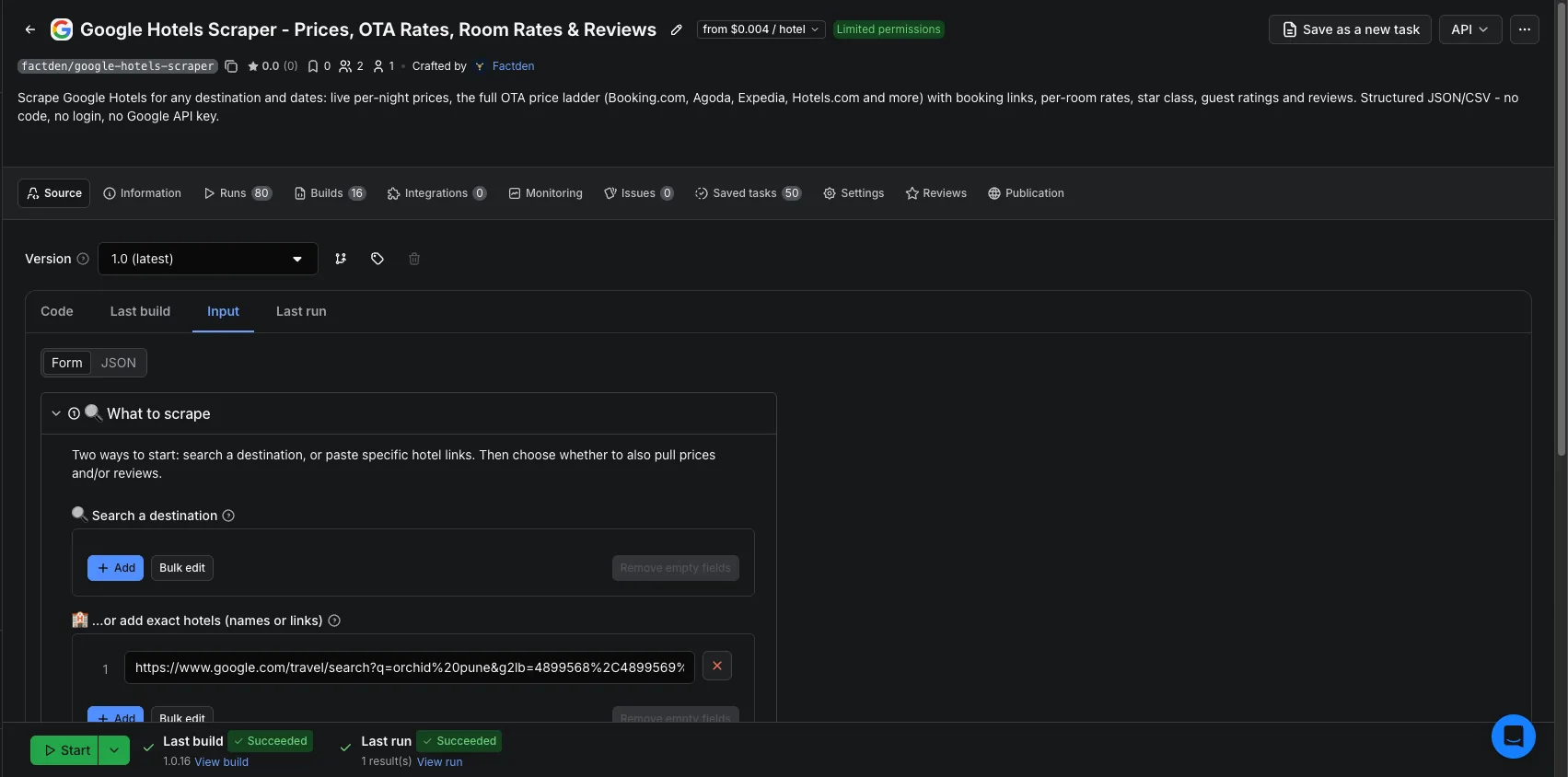
Open the actor on Apify, enter a destination search (or paste hotel URLs/IDs), set your dates and occupancy, toggle prices and reviews, click Start, and download results as JSON, CSV, Excel, or HTML - or pull them from the API on a schedule. The developer docs, full field dictionary, and copy-paste snippets live in the GitHub repo.
Frequently asked questions
- How much does it cost to scrape Google Hotels?
- Pay-per-event, no start fee: Hotel $0.004 each, Prices $0.005 per hotel per date (full OTA ladder + rooms), Review $0.001 each. A fully-priced hotel is $0.009, discovery-only is $0.004. New accounts get $5 free credit (~555 fully-priced hotels); paid plans get a lower rate.
- Do I need a Google account or API key?
- No. Everything runs inside the actor on Apify - no login, no Google API key, no setup.
- Which booking sources does the price ladder include?
- Every source Google shows for a hotel - typically 15–25, including Booking.com, Agoda, Expedia, Hotels.com, Priceline, Trip.com and KAYAK - each with its price and, where available, a booking link, all on one row.
- Can I price specific hotels instead of a whole city?
- Yes - add hotels by name, a Google Hotels/Maps link, a
maps.app.goo.glshort link, aChIJplace-id or aChkIentity token, and set Track prices until for a multi-date price window. - Does it also scrape Google Hotels reviews?
- Yes - turn on Include reviews for one row per guest review with reviewer, rating, review text, exact publish date and owner response, billed at $0.001 per review.
- Why do a few hotels have no price ladder?
- Almost all do. A property with no bookable offers on your dates still returns its name, rating, star class, coordinates and reviews - just an empty ladder.
- Can I schedule daily or continuous price monitoring?
- Yes. Run it on an Apify schedule (hourly or daily) and append each run to build a rate history - Apify handles the cron, storage, API and webhooks, with no server to run.
- How many hotels can I get for one city?
- A destination search paginates and de-duplicates results; set Max hotels (0 = no cap). Very large markets hit Google's per-query ceiling, so split by area, star class or price band for a full-market sweep.
- How fresh are the prices?
- Live. Prices are fetched from Google at run time for your exact dates and occupancy - the same rates a visitor would see then.
- Which countries and currencies are supported?
- 13 Google country markets, 20 currencies and 9 interface languages. Country changes which hotels appear, the pricing market and the OTA mix.
- How does it compare to enterprise rate-shopping tools?
- You get the same public rate-parity data - every OTA's price per hotel, across dates - on pay-per-use pricing instead of a fixed monthly seat, and you own the raw data to pipe anywhere.
Read the full guide: step-by-step tutorial → · Expedia scraper → · Hotels.com scraper → · MakeMyTrip & Goibibo scraper →