
How to Scrape Expedia & Hotels.com Hotel Reviews (2026 Guide)
Expedia holds one of the deepest pools of hotel guest feedback on the Western web, and it shares that data across seven sister brands, Hotels.com, Travelocity, Orbitz and more. This guide covers what you can extract, why one property's reviews are scattered across several sites, and the fastest way to get clean, structured review data from all of them at once.
Why scrape Expedia reviews?
For hotels, OTAs, and hospitality analysts, Expedia Group review data is some of the highest-signal feedback available:
- Reputation & sentiment monitoring: track guest sentiment for your own or competitor properties over time.
- Competitor benchmarking: pull rating distributions, category sub-scores, and review volume per property at scale.
- Market research: analyze traveler types, languages, and what guests actually praise or complain about.
- Guest-experience & AI: feed structured, LLM-ready review text into sentiment analysis or a RAG pipeline.
The catch: one hotel, seven Expedia Group brands
Expedia, Hotels.com, Travelocity, Orbitz, Wotif, CheapTickets, and ebookers are all part of Expedia Group and share inventory, but each brand surfaces a different slice of guest reviews for the same property. If you scrape only expedia.com, you miss the Hotels.com and Travelocity guests entirely. Getting the complete picture of a hotel normally means running several scrapers and reconciling inconsistent datasets by hand.
Every Expedia Group site, in one run
Point the scraper at any Expedia Group brand and it returns that site's reviews, or combine several to build the cross-brand union for a property. Each brand reaches a different audience, so together they give the most complete review coverage available:
- Expedia - the flagship global OTA and the largest single pool of hotel reviews in the group. Paste any regional Expedia domain; the property sits in the
.h<id>.segment of the URL. - Hotels.com - a hotel-only brand with its own large, distinct review base. Scrape Hotels.com reviews directly from
/ho<id>/URLs, which the actor resolves automatically, alongside or instead of Expedia. - Travelocity - a major US online travel agency. Pull Travelocity guest reviews for the North-American traveller view of a hotel.
- Orbitz - an established US booking site with its own reviewer base, useful for a second American signal.
- Wotif - the leading Australia and New Zealand brand, the one to use for APAC market coverage.
- CheapTickets - a value-focused US brand that surfaces budget-traveller sentiment.
- ebookers - the group's European and UK brand for continental and British guest reviews.
Use the Review sources filter to return a single brand, a chosen subset, or leave it empty for the full cross-brand union of every review on the property.
What data can you get?
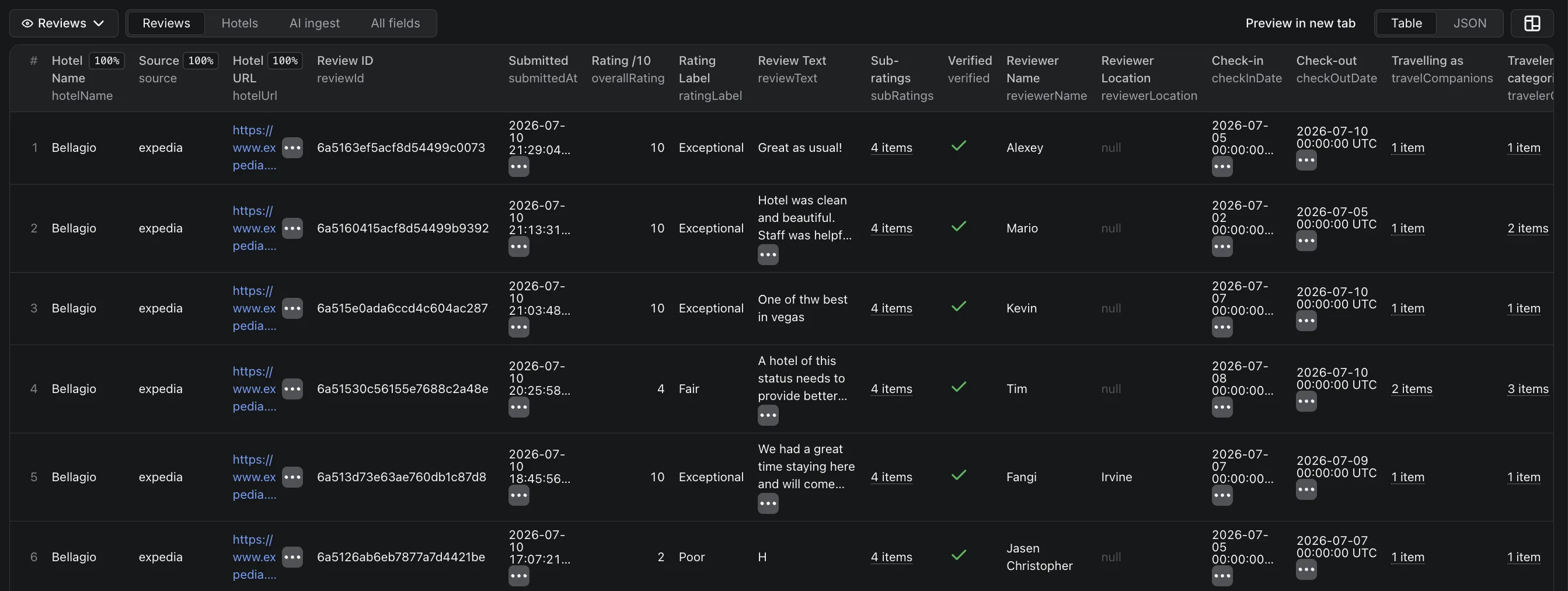
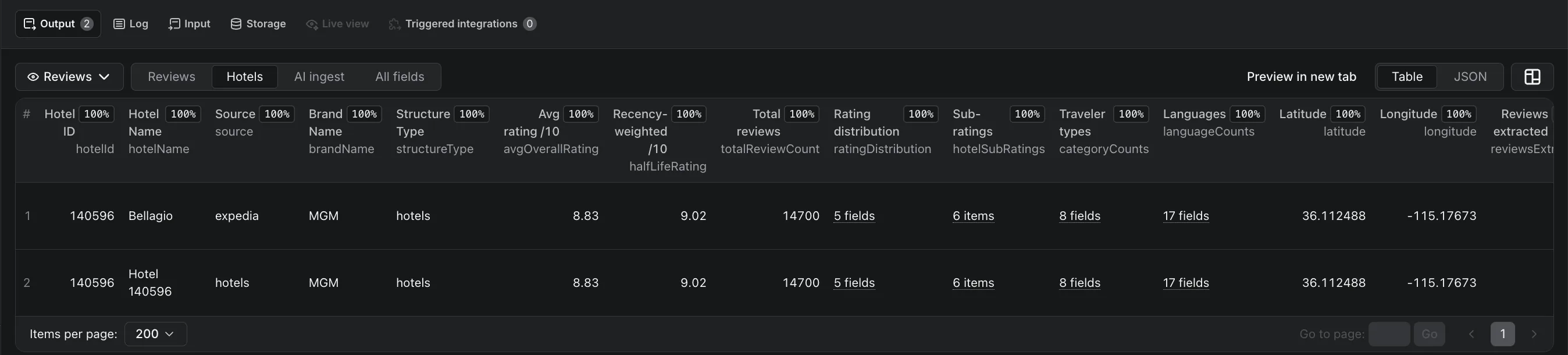
The actor returns one item per hotel with every review nested underneath, so you get both a per-hotel roll-up and per-review detail:
- Overall rating on Expedia's 1–10 scale plus a rating label ("Exceptional", "Good"…)
- Category sub-ratings: cleanliness, service & staff, hotel condition, amenities
- Traveler companions (partner, family, business, solo) and review language with a machine-translation flag
- Review photos (guest-uploaded image URLs) and a verified-stay flag
- Hotel owner responses, kept separate from the review body
- Per hotel: average rating, a recency-weighted "half-life" rating, the full rating distribution, aggregate sub-ratings, coordinates, and total review count
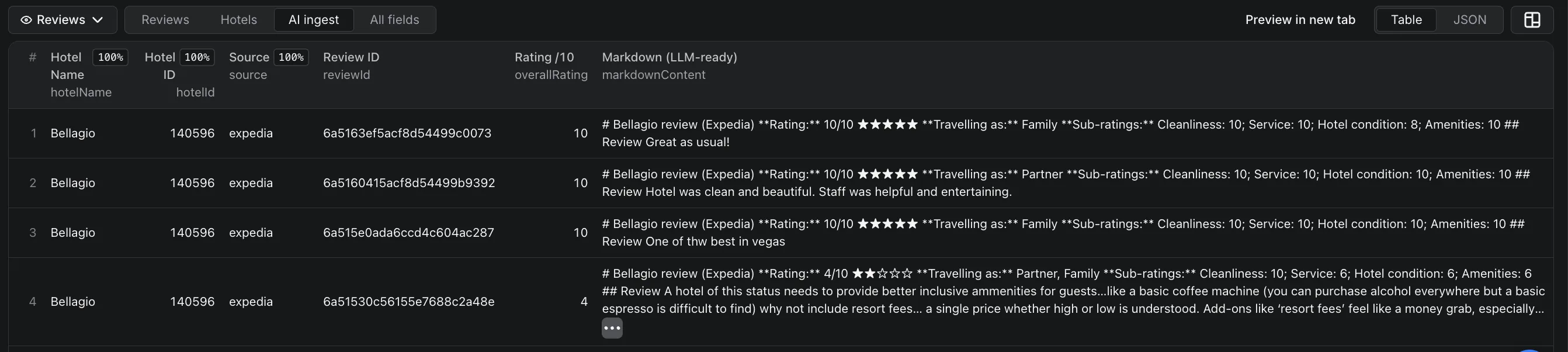
- An LLM-ready markdown rendering of every review for AI pipelines
Ratings are presented on the 1–10 scale to match Expedia's public display (the source stores a 1–5 value, which the actor doubles).
Why building your own breaks
- Changing layouts: Expedia Group sites change their pages and pagination often, so keeping a scraper working is ongoing maintenance.
- Seven brands, one property: different URL formats and review pools to resolve and merge.
- Multilingual content: reviews in many languages, some machine-translated, needing consistent structured output.
- Pagination & scale: thousands of reviews on large properties, with retries and rate limits.
The fast way: the FactDen Expedia Reviews Scraper
The FactDen Expedia Reviews Scraper on the Apify platform pulls reviews from any Expedia Group brand, with no login, no cookies, and no API key.
Step 1: Open the actor
Go to the Expedia Reviews Scraper Hotels.com Reviews Scraper Agoda Reviews Scraper on Apify and click Try for free (a free Apify account is all you need).
Step 2: Give it a hotel
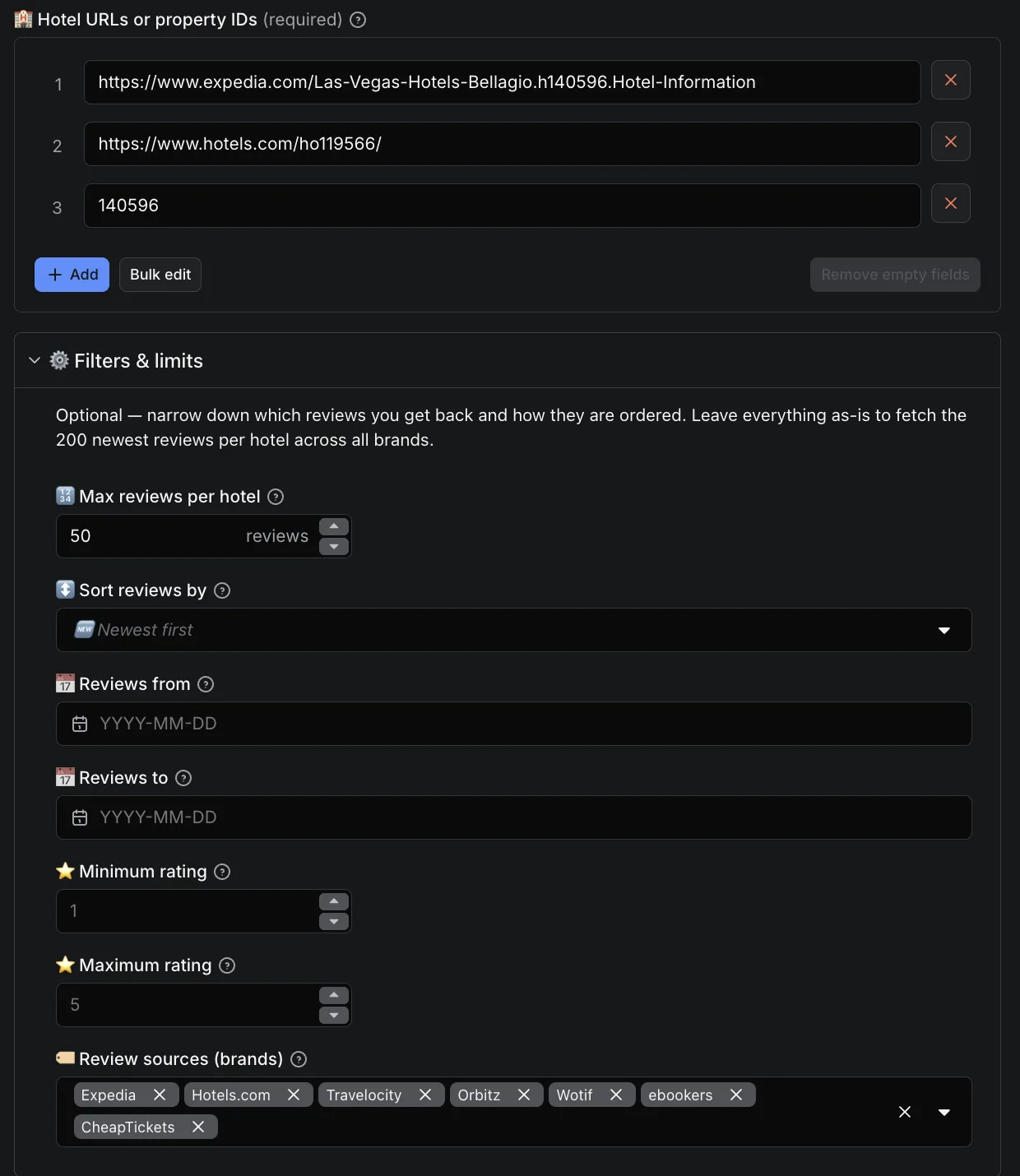
Paste one or more hotel-page URLs from any Expedia Group site (each Expedia URL carries the property in a .h<id>. segment; Hotels.com /ho<id>/ links are resolved automatically), or just bare property IDs. Set Max reviews per hotel, an optional date or rating range, a sort order, and which brands to include.
Step 3: Run it
The actor handles pagination, retries, parsing, and every brand you selected, writing clean structured rows to a dataset as it goes.
Step 4: Export
Download as JSON, CSV, Excel, or HTML, or pull via the Apify API. Switch between the Reviews, Hotels, and AI ingest views to get per-review rows, a per-hotel roll-up, or just the LLM-ready markdown.
See the data first. Grab a free sample of real Expedia reviews, structured fields with sub-ratings, traveler type, language, and owner responses, before you run anything.
What does it cost?
Pricing is pay-per-result with no start fee, roughly $2.50 per 1,000 reviews, dropping toward $2 per 1,000 at higher volume tiers. You pay only for the reviews you extract, a run that returns zero reviews costs nothing, and there's a free tier to test first. Because reviews are fetched newest-first, a tight From date plus a low Max reviews per hotel is the cheapest way to monitor only what's new.
Frequently asked questions
- Can it scrape Hotels.com, Travelocity and Orbitz too?
- Yes. It accepts URLs from all seven Expedia Group brands (Expedia, Hotels.com, Travelocity, Orbitz, Wotif, CheapTickets, ebookers) and can return the cross-brand union of reviews for one property in a single run.
- Can I scrape Wotif, CheapTickets or ebookers reviews?
- Yes. Alongside Expedia, Hotels.com, Travelocity and Orbitz, the scraper supports the group's regional brands: Wotif (Australia & New Zealand), CheapTickets (US), and ebookers (Europe & the UK). Paste a hotel URL from any of them, or a bare property ID.
- How much does it cost?
- Pay-per-result, no start fee, about $2.50 per 1,000 reviews and toward $2 per 1,000 at volume.
- Do I need a login or API key?
- No. No login, no cookies, no Expedia API key.
- Can I export to CSV or Excel?
- Yes, JSON, CSV, Excel, or HTML, or via the Apify API.
- What rating scale is used?
- Ratings are shown on Expedia's 1–10 scale (the source's 1–5 value doubled), for both per-review and aggregate hotel ratings.
Try the Expedia Reviews Scraper
Also see: How to scrape Trip.com & Ctrip hotel reviews → · How to scrape Google Hotels prices →
Product page: Expedia Reviews Scraper - fields, pricing & FAQ →