
How to Scrape G2 Reviews for Competitive Intelligence (2026 Guide)
G2 holds millions of structured opinions about B2B software, who's winning, who's losing, and crucially why buyers switch. This guide covers what you can extract, why building your own scraper usually breaks, and the fastest way to get clean, analysis-ready G2 review data.
Want to see what this data reveals at scale? Read our 2026 SaaS Battlecard Atlas, built from 50,000 G2 reviews across 25 tools.
Why scrape G2 reviews?
G2 is where software buyers leave detailed, verified feedback before and after purchase. For competitive intelligence, product marketing, and RevOps teams, that's gold:
- Battlecards & win-loss: see exactly which competitors your buyers evaluated and switched from, in their own words.
- Voice of customer: mine structured pros and cons across hundreds of reviews instead of reading them one by one.
- Category tracking: monitor review velocity, rating shifts, and emerging complaints across an entire software category.
- AI / RAG pipelines: feed clean, structured review text into an LLM workflow for summarization or Q&A.
What data can you get from a G2 review?
A single G2 review carries far more than a star rating. A complete extraction includes:
- Overall star rating and six sub-ratings (ease of use, quality of support, ease of setup, and more)
- Structured pros and cons, separated rather than mashed into one text block
- The competitor the reviewer switched from, the single most valuable field for battlecards
- Reviewer role, company size, and industry
- Whether the review was incentivized
- Review date, helpfulness, and verification status
- An LLM-ready markdown rendering of the full review, ready for a RAG pipeline
Why building your own G2 scraper usually breaks
Plenty of engineers start by writing a quick script. It tends to fall apart fast:
- Changing layouts. G2 changes its pages and pagination often, and a quick script tends to stop working without warning.
- Unstructured HTML. Even when a page loads, turning the markup into clean fields, splitting pros from cons, isolating sub-ratings, catching the switched-from value, is fiddly and breaks every time the layout changes.
- Pagination & scale. Pulling thousands of reviews across many products means handling pagination, retries, and rate limits reliably.
- Maintenance. Sites change. A scraper you build is a scraper you now own forever.
This is why most teams use a maintained extractor instead of rolling their own: you pay for the result, not the upkeep.
The fast way: the FactDen G2 Reviews Scraper
The FactDen G2 Reviews Scraper on the Apify platform returns structured G2 review data with no G2 login, no cookies, and no API key. Here's the full workflow.
Step 1: Open the actor
Go to the G2 Reviews Scraper on Apify and click Try for free. You'll need a free Apify account.
Step 2: Choose your input
You can drive the run two ways:
- By product URL: paste one or more G2 product page URLs (up to 100 in a single run).
- By search term: give a search query and let the actor find matching products.
Then set how many reviews per product you want, an optional date range, a minimum/maximum rating, and a sort order (newest, most helpful, or by rating).
Step 3: Run it
Start the run. The actor handles pagination, retries, and parsing for you, writing clean rows to a dataset as it goes. A typical product pull finishes in minutes.
Step 4: Export the data
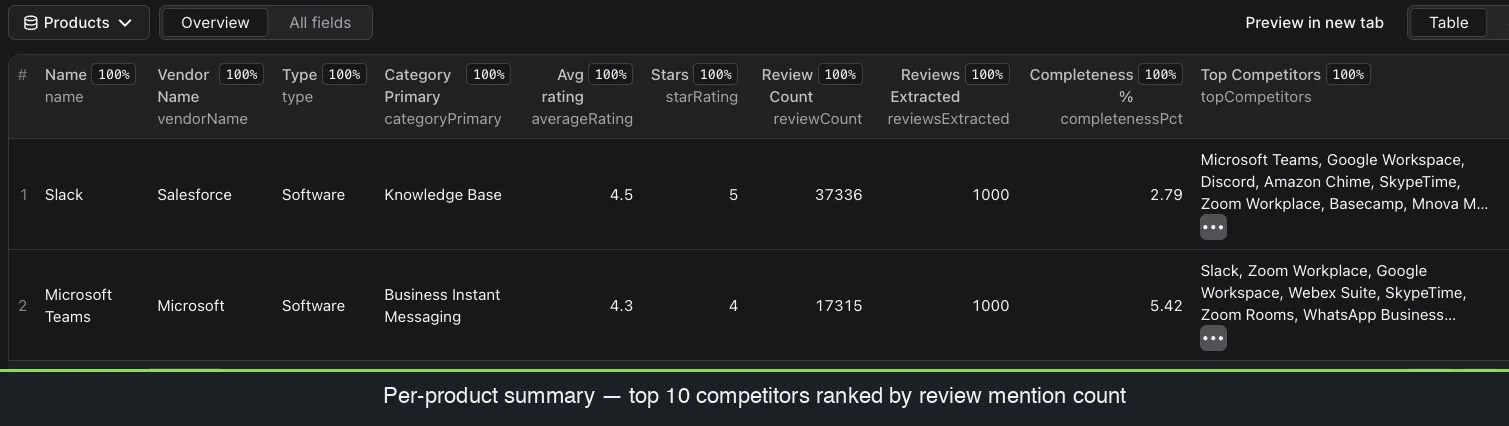
Download the dataset as JSON, CSV, Excel, or HTML, or pull it through the Apify API into your own pipeline. Each row is a fully structured review; a separate per-product summary gives you ratings, the top-10 competitors, and completeness stats.
Tip for competitive intelligence: filter to the switchedFrom field across a product's reviews and you get an instant, evidence-backed switching matrix, exactly what a battlecard needs, sourced from real buyers rather than guesswork.
Want to see the data first? Get a free G2 sample dataset (2,500 rows, 27 fields) and explore the structure before you run anything.
What does it cost?
Pricing is $4 per 1,000 reviews, pay-per-result, you're billed for the reviews you actually extract, not for compute time. A 250-review pull for one product costs about a dollar. There's a free tier to test it first.
Frequently asked questions
- Is it legal to scrape G2 reviews?
- These reviews are public by design. Extracting publicly available pages is generally permissible, collect only public data, avoid personal information beyond what's publicly shown, and use it responsibly. Check G2's terms and your own legal guidance for your specific use case.
- How much does it cost to scrape 1,000 G2 reviews?
- About $4, pricing is $4 per 1,000 reviews on a pay-per-result basis.
- Do I need a G2 login or API key?
- No. No login, no cookies, no API key. You provide a URL or search term; the actor returns the data.
- Can I export G2 reviews to CSV or Excel?
- Yes, datasets export to JSON, CSV, Excel, or HTML, or via the Apify API.
- How many fields do you get per review?
- Up to 32, including six sub-ratings, structured pros/cons, the switched-from competitor, reviewer role and company size, incentivization flag, and an LLM-ready markdown rendering.
Ready to pull your first dataset? Open the G2 Reviews Scraper
Next: G2 review scraper compared, tool vs DIY vs official data →
Product page: G2 Reviews Scraper - fields, pricing & FAQ →