
How to Scrape Indeed Jobs for Hiring & Labor-Market Data (2026 Guide)
Indeed is one of the largest job-listing aggregators in the world, a live feed of who's hiring, for what, where, and at what pay. This guide covers what you can extract from Indeed postings, why building your own scraper usually breaks, and the fastest way to get clean, analysis-ready job data.
For a field-by-field breakdown of the output, see the Indeed jobs dataset reference: parsed salary, geo, benefits, and a free company dataset.
Why scrape Indeed job postings?
Indeed aggregates millions of active job listings across nearly every industry and region. For recruiting, talent intelligence, and labor-market analytics teams, that's a rich, continuously updated dataset:
- Hiring-demand mapping: find companies that are actively hiring for specific roles, in specific locations, right now.
- Salary benchmarking: aggregate posted pay ranges across a role and geography to benchmark compensation.
- Hiring-trend analysis: track posting volume, role mix, and remote-vs-onsite shifts across a market or competitor set over time.
- Job boards & aggregation: feed fresh, structured listings into your own job board or product.
- AI / RAG pipelines: feed clean, structured posting text into an LLM workflow for matching, summarization, or Q&A.
What data can you get from an Indeed job posting?
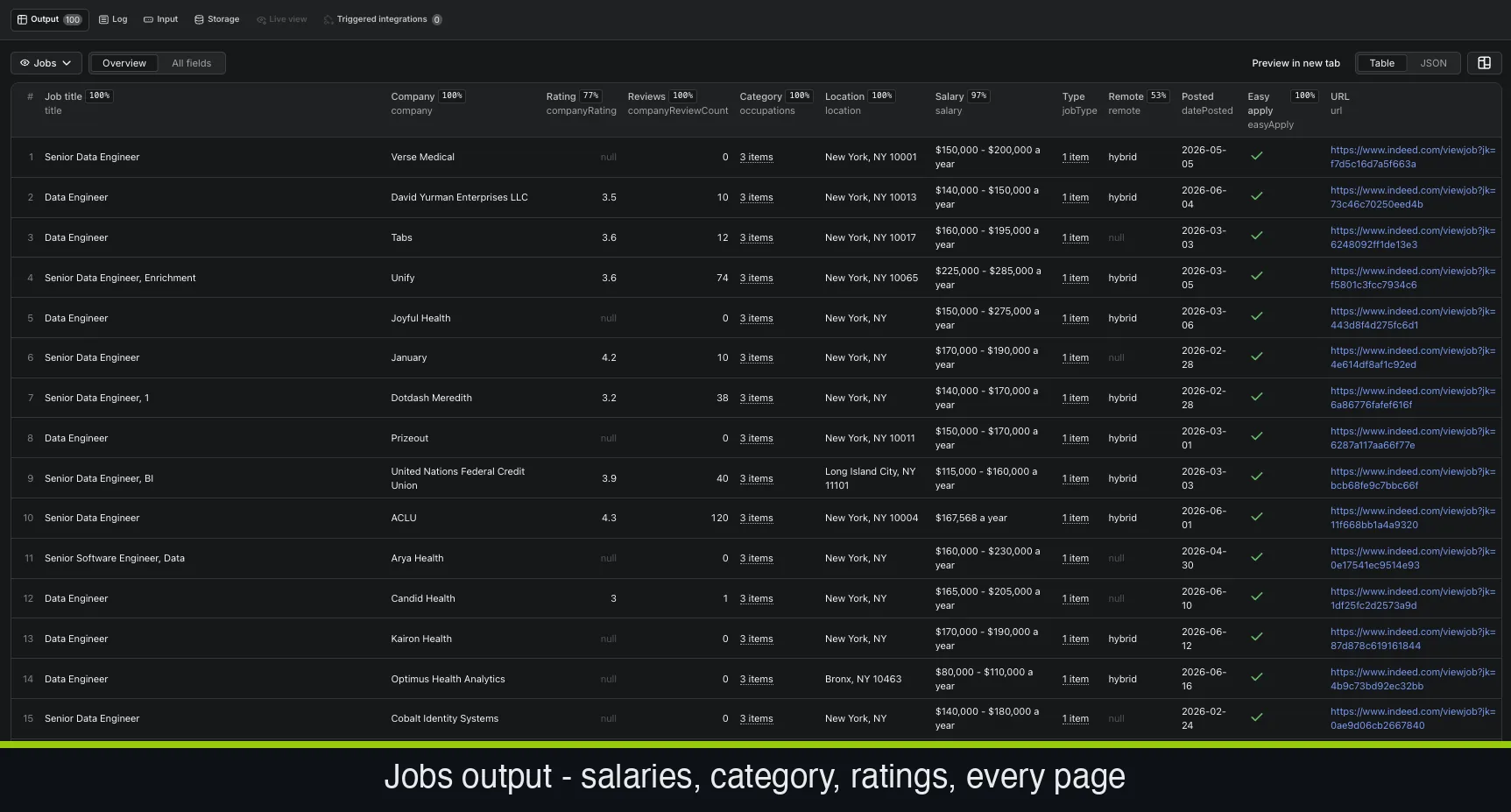
Every job is returned as a typed row, not a blob of text. Each record includes:
- A stable jobKey, the title, and the company
- Company rating and review count from Indeed's employer reviews
- Occupations / job function (often several per role)
- Location, and whether the role is remote, hybrid, or on-site
- Parsed salary range, where the posting discloses it
- Job type (full-time, part-time, contract, and more) and listed benefits
- Posting date and an easy-apply flag
- The full job description and the apply URL
Free bonus: a company profile for every employer
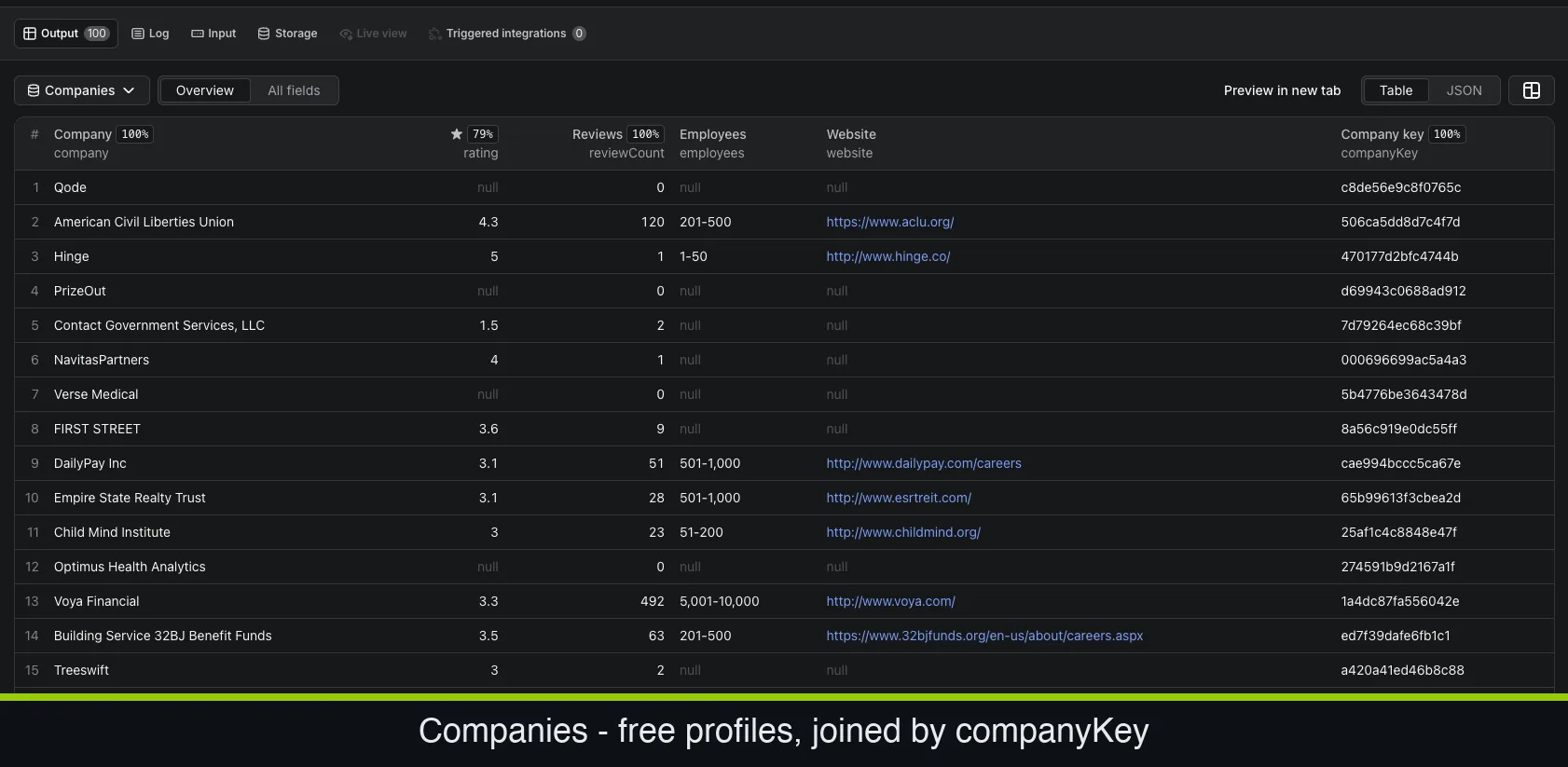
Flip on Company profiles in the input, it's free, with no extra per-result charge, and the run also returns a second, de-duplicated companies dataset, one profile per employer (each keyed by a stable companyKey) that you can match to the jobs by company. Each profile includes:
- Company name, website, and social links
- Rating and review count
- Industry, employee size, revenue, CEO, and founded year
- A stable companyKey identifier for the employer
Why building your own Indeed scraper usually breaks
Plenty of engineers start by writing a quick script. It tends to fall apart fast:
- Changing layouts. Indeed changes its pages and pagination often, and a quick script tends to stop working without warning.
- Unstructured HTML. Even when a page loads, turning the markup into clean fields, isolating the salary, normalizing locations, separating job type, is fiddly and breaks every time the layout changes.
- Pagination & scale. Pulling thousands of postings across many searches means handling pagination, retries, and rate limits reliably.
- Maintenance. Sites change. A scraper you build is a scraper you now own forever.
This is why most teams use a maintained extractor instead of rolling their own: you pay for the result, not the upkeep.
The fast way: the FactDen Indeed Jobs Scraper
The FactDen Indeed Jobs Scraper on the Apify platform returns structured Indeed job data with no Indeed login, no cookies, and no API key. Here's the full workflow.
Step 1: Open the actor
Go to the Indeed Jobs Scraper on Apify and click Try for free. You'll need a free Apify account.
Step 2: Configure the search
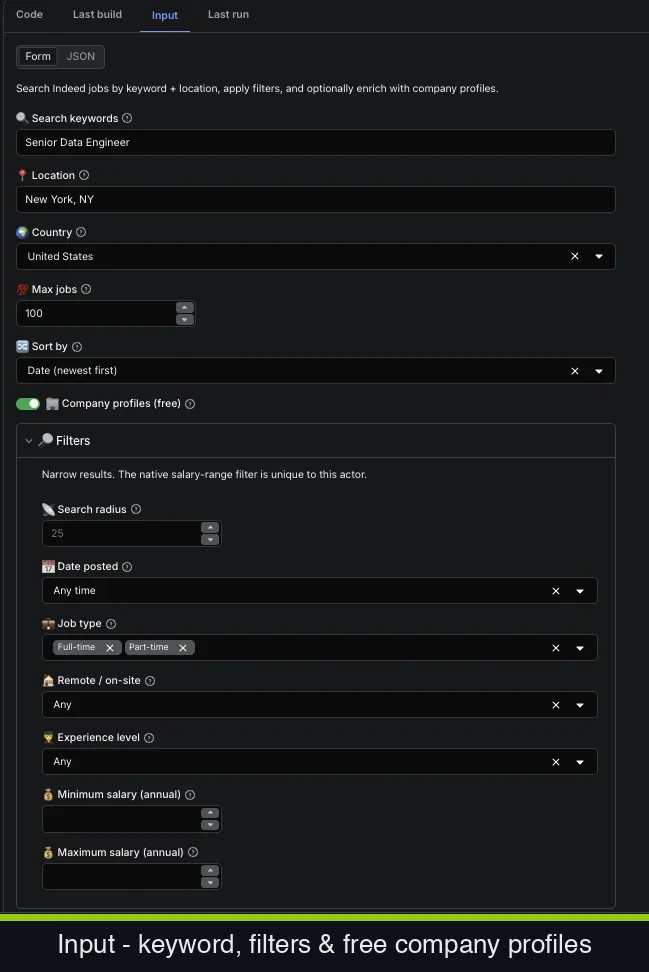
Drive the run with a few simple fields:
- Search keywords (e.g. Senior Data Engineer) and location (e.g. New York, NY)
- Country and max jobs to return
- Sort by date (newest first) or relevance
- Company profiles, the free enrichment toggle, on by default
Then narrow with the filters: search radius, date posted, job type, remote / on-site, experience level, and a minimum/maximum annual salary range, the native salary-range filter is unique to this actor.
Step 3: Run it
Start the run. The actor handles pagination, retries, and parsing for you, writing clean rows to a dataset as it goes. A typical search pull finishes in minutes.
Step 4: Export the data
Download the dataset as JSON, CSV, Excel, or HTML, or pull it through the Apify API into your own pipeline. Each row is a fully structured job posting.
Tip for talent intelligence: group postings by company and role, then track posting volume over time, you get an evidence-backed view of who's scaling which teams, sourced from live listings rather than guesswork.
Want to see the data first? Grab a free Indeed jobs sample, or download the full 1,000-job + 536-company dataset on HuggingFace or Kaggle, then run the actor for fresh data.
What does it cost?
Pricing is pay-per-result: $2 per 1,000 jobs (with volume discounts down to $1.20 per 1,000), plus a one-off $0.01 per run. You're billed for the results you actually extract, not for compute time, and the free company profiles add no per-result charge. There's a free tier (about $5/month, ~2,500 jobs) to test it first.
Frequently asked questions
- Is it legal to scrape Indeed job postings?
- These postings are public by design. Extracting publicly available pages is generally permissible, collect only public data, avoid personal information beyond what's publicly shown, and use it responsibly. Check Indeed's terms and your own legal guidance for your specific use case.
- Do I need an Indeed login or API key?
- No. No login, no cookies, no API key. You provide a search or URL; the actor returns the data.
- How much does it cost to scrape Indeed jobs?
- $2 per 1,000 jobs on a pay-per-result basis (volume discounts down to $1.20 per 1,000), plus a $0.01 run fee. The free company profiles add no extra charge.
- Can I export Indeed jobs to CSV or Excel?
- Yes, datasets export to JSON, CSV, Excel, or HTML, or via the Apify API.
- What fields do you get per posting?
- Per job: jobKey, title, company, company rating and review count, occupations, location, parsed salary, job type, benefits, remote/on-site, posting date, an easy-apply flag, the full description, and the apply URL.
- Does it include company data?
- Yes, and it's free. Enable Company profiles and the run returns a second, de-duplicated companies dataset, one row per employer, with name, website, social links, rating, review count, industry, employee size, revenue, CEO, founded year, and a stable
companyKey, at no extra per-result charge.
Ready to pull your first dataset? Open the Indeed Jobs Scraper
More guides: How to scrape G2 reviews →
Product page: Indeed Jobs Scraper - fields, pricing & FAQ →