
How to Scrape Agoda Hotel Reviews (2026 Guide)
Agoda holds one of the deepest pools of hotel guest feedback in Asia-Pacific, and it surfaces not just its own reviews but the Booking.com and Priceline guests it aggregates. This guide covers what you can extract, why Agoda review data is high-signal for hoteliers and analysts, and the fastest way to get clean, structured reviews - with scores, translated text, reviewer country and traveler type - without writing a scraper.
Why scrape Agoda reviews?
For hotels, OTAs, and hospitality analysts, Agoda review data is some of the highest-signal feedback available for the APAC market:
- Reputation & sentiment monitoring: track guest sentiment for your own or competitor properties over time, and catch new reviews on a schedule.
- Competitor benchmarking: pull aggregate scores, review volume and per-source breakdowns per property at scale.
- Market research: analyze reviewer nationality, traveler type, and what guests actually praise or complain about.
- Guest-experience & AI: feed structured, LLM-ready review text into sentiment analysis or a RAG pipeline.
What data can you get?
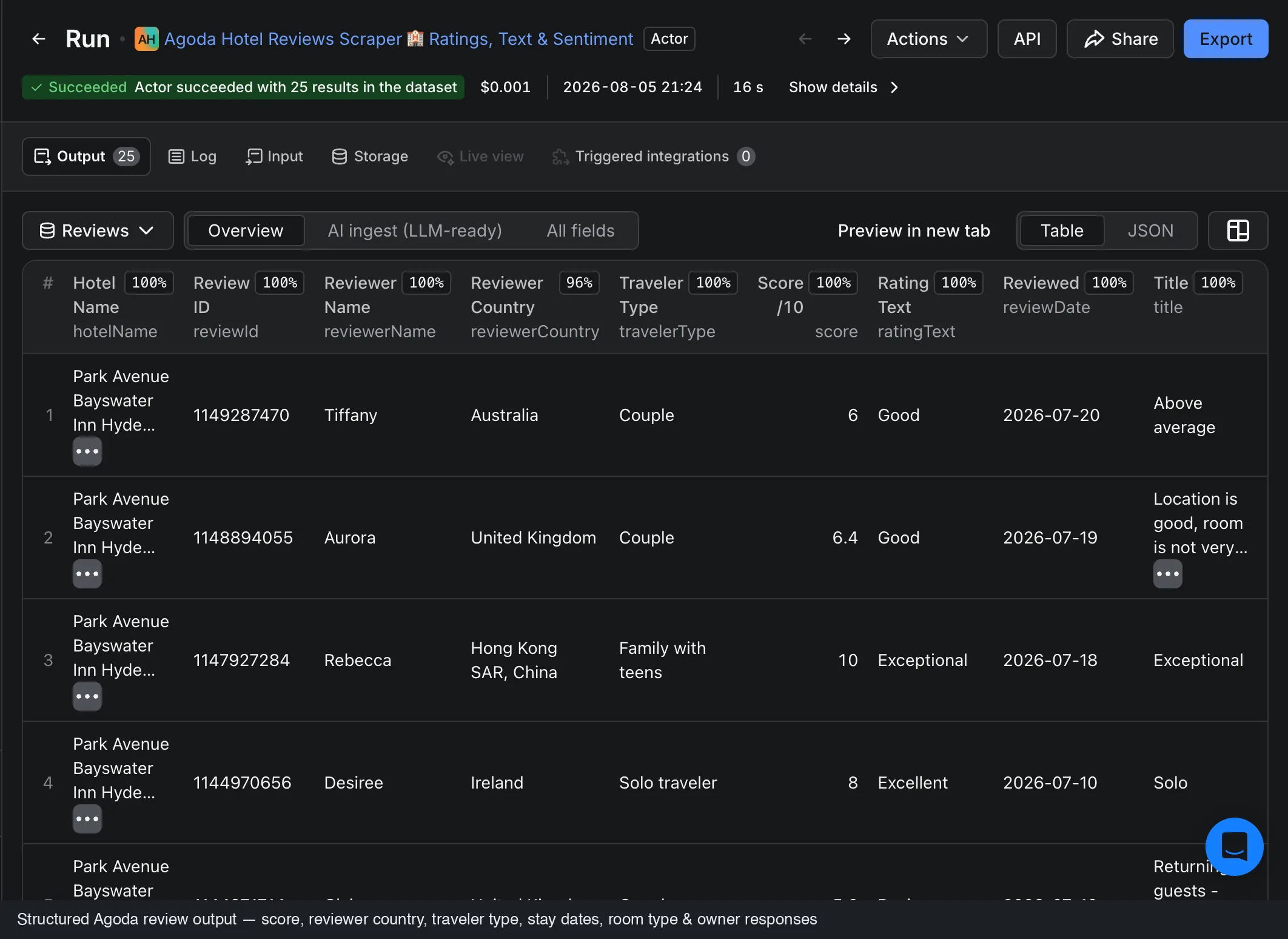
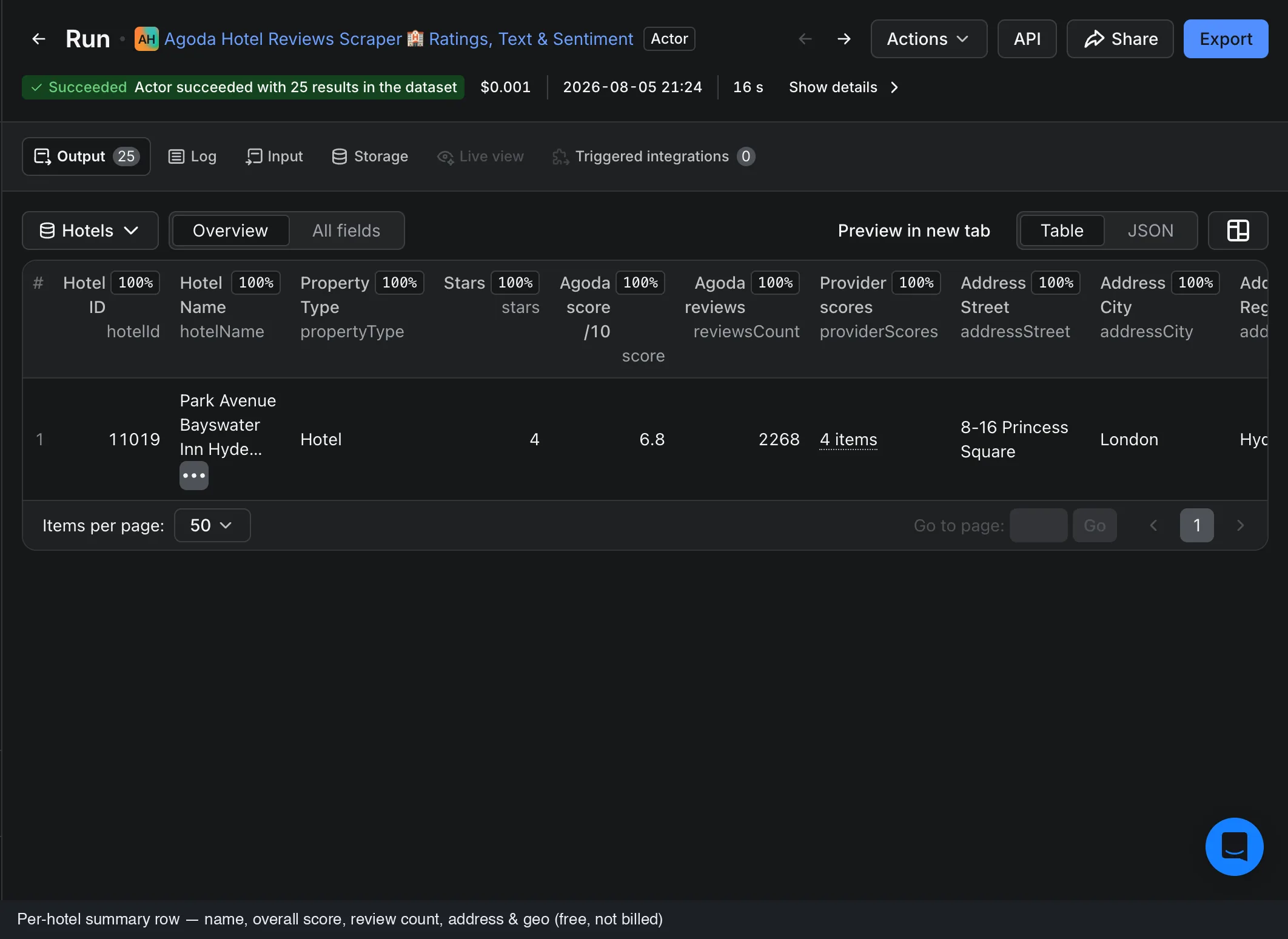
The actor returns one row per guest review, with the hotel context merged on, plus a separate per-hotel profile row:
- The guest score on Agoda's 0–10 scale
- The original review text and Agoda's translated version, side by side
- Separate positive and negative comments (what the guest liked and disliked)
- Reviewer country and traveler type (solo, couple, family, business), plus room type and stay date
- Review photos (guest-uploaded image URLs) and management owner responses, kept separate from the review body
- Per hotel: name, address, coordinates, star class, the aggregate Agoda score, total review count and per-source scores
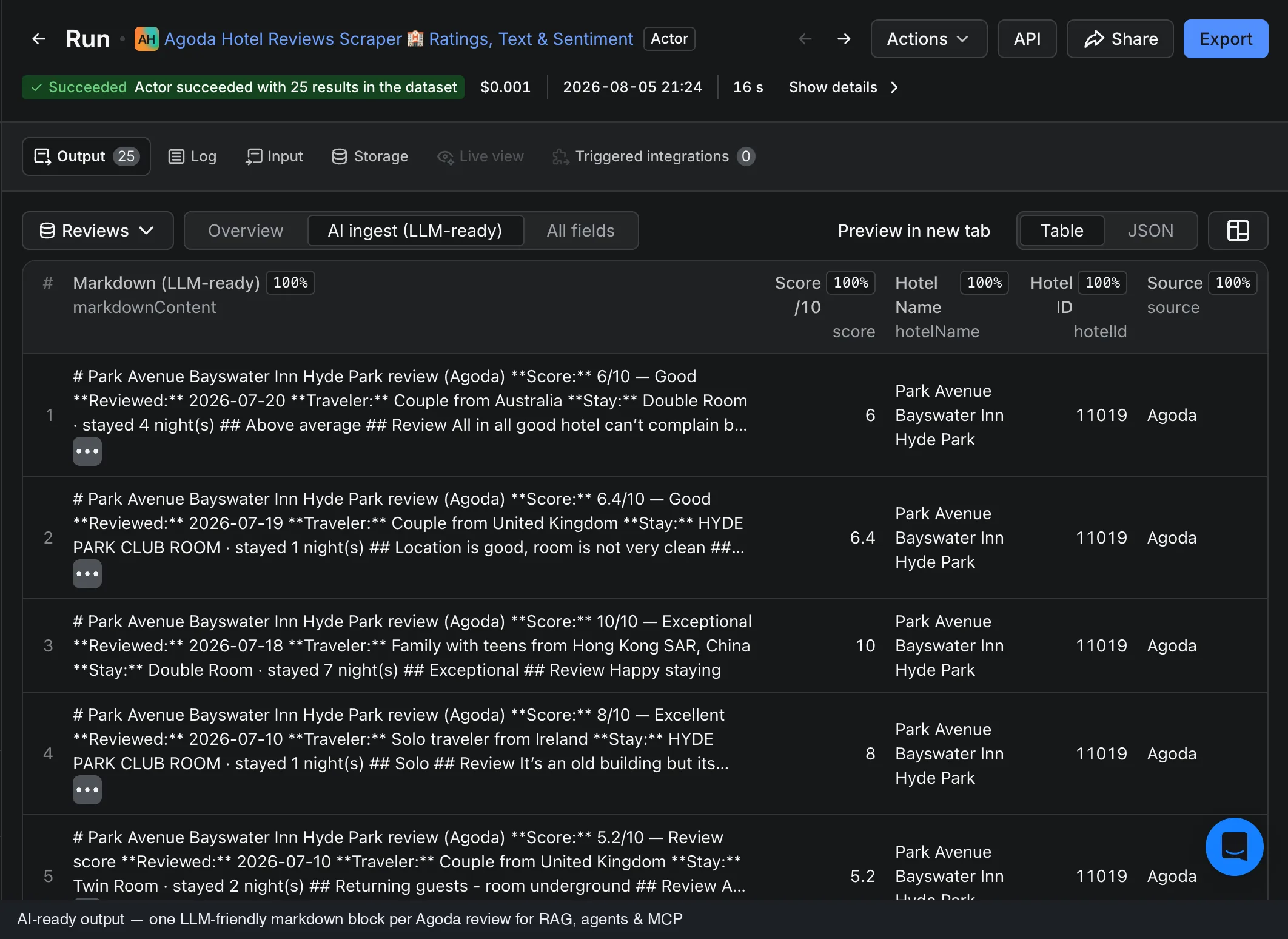
- An LLM-ready markdown rendering of every review for AI pipelines
Agoda reviews come from more than Agoda
Agoda aggregates guest reviews from several booking sites, so a single property page can carry Agoda's own reviews plus Booking.com and Priceline guests. That is a strength - more coverage in one place - but it also means you want control over which sources you keep. Use the Review sources filter to return Agoda-only (the default), a chosen subset, or leave it open for the full mix of every source Agoda shows for the hotel.
Why building your own breaks
- Changing layouts: Agoda changes its pages and pagination often, so keeping a scraper working is ongoing maintenance.
- Multiple review sources: Agoda, Booking.com and Priceline guests to separate and label per property.
- Multilingual content: reviews in dozens of languages, each with an original and a translated form, needing consistent structured output.
- Pagination & scale: thousands of reviews on large properties, with retries and rate limits.
The fast way: the FactDen Agoda Reviews Scraper
The FactDen Agoda Reviews Scraper on the Apify platform pulls reviews from any Agoda hotel page, with no login, no cookies, and no API key.
See it in action
This 90-second walkthrough runs the whole flow end to end: paste a hotel URL, run the actor, and export clean review rows to CSV or JSON.
Step 1: Open the actor
Go to the Agoda Reviews Scraper on Apify and click Try for free (a free Apify account is all you need).
Step 2: Give it a hotel
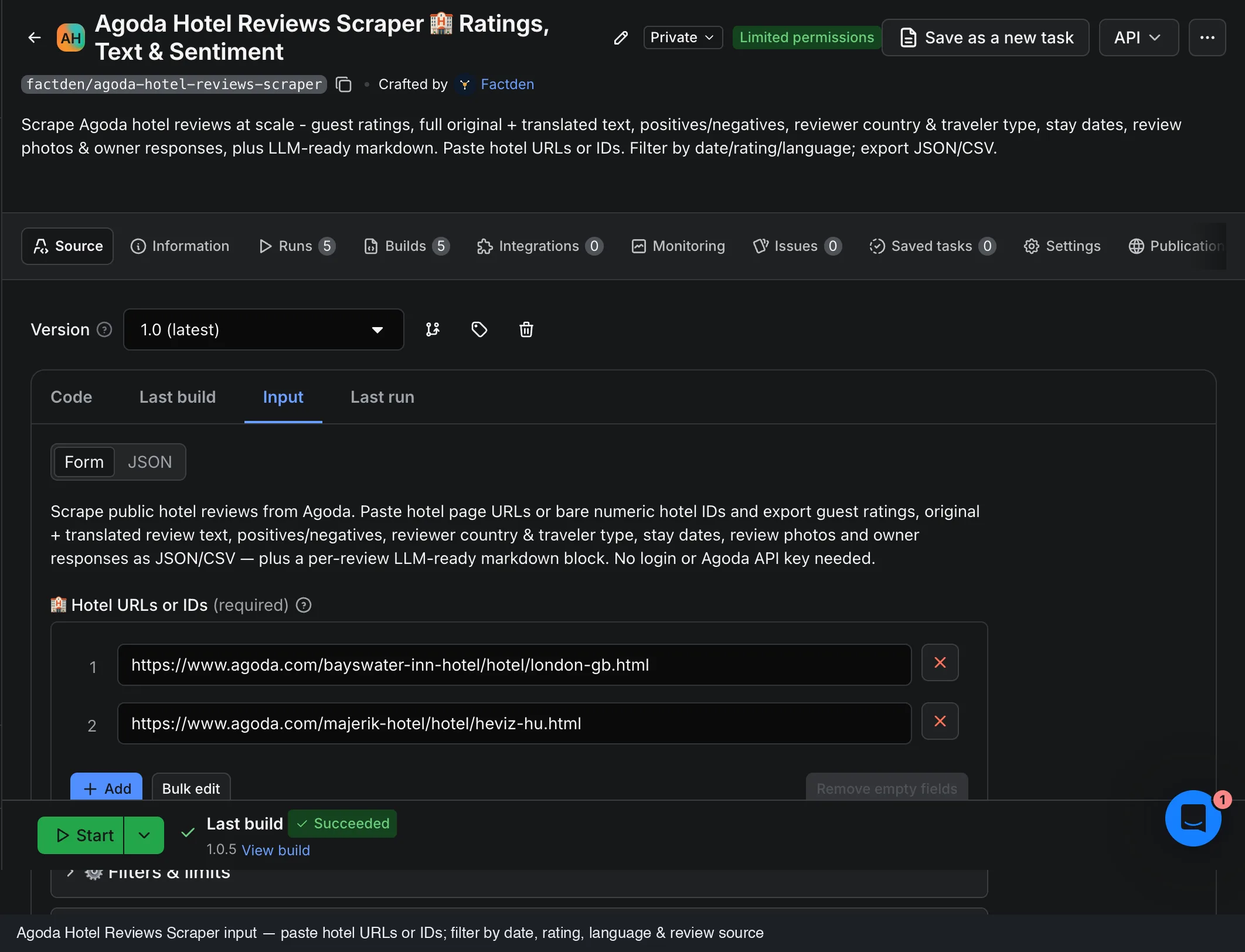
Paste one or more Agoda hotel-page URLs (any regional Agoda domain, with a locale prefix or query string, is fine) or just bare numeric hotel IDs. Set Max reviews per hotel, an optional date or rating range, a sort order, the review languages, and which sources to include.
Step 3: Run it
The actor handles pagination, retries, parsing, and each source you selected, writing clean structured rows to a dataset as it goes.
Step 4: Export
Download as JSON, CSV, Excel, or HTML, or pull via the Apify API. Switch between the Reviews, Hotels, and AI ingest views to get per-review rows, a per-hotel profile, or just the LLM-ready markdown.
See the data first. Grab a free sample of real Agoda reviews - 100 rows with /10 scores, reviewer country, traveler type and owner responses - before you run anything.
Monitoring only what is new? Because reviews are fetched newest-first, a tight From date plus a low Max reviews per hotel is the cheapest way to schedule a daily or weekly pull of just the fresh reviews.
What does it cost?
Pricing is pay-per-result with no start fee, roughly $4 per 1,000 reviews, dropping toward $2 per 1,000 at higher volume tiers. You pay only for the reviews you extract, a run that returns zero reviews costs nothing, the per-hotel profile is free, and there's a free tier to test first.
Frequently asked questions
- Can it scrape Booking.com and Priceline reviews from Agoda too?
- Yes. Agoda aggregates Booking.com and Priceline reviews alongside its own; the Review sources filter returns Agoda-only, a subset, or the full mix.
- Can I filter Agoda reviews by language?
- Yes. Restrict the pull to any of Agoda's supported review languages, or leave it open for a single combined stream across all languages.
- How much does it cost?
- Pay-per-result, no start fee, about $4 per 1,000 reviews and toward $2 per 1,000 at volume. Hotel profiles are free.
- Do I need a login or API key?
- No. No login, no cookies, no Agoda API key.
- Can I export to CSV or Excel?
- Yes, JSON, CSV, Excel, or HTML, or via the Apify API.
- What rating scale is used?
- Agoda scores guests on a 0–10 scale, for both per-review and aggregate hotel scores.
Also see: How to scrape Expedia & Hotels.com reviews → · How to scrape Google Hotels prices →
Product page: Agoda Reviews Scraper - fields, pricing & FAQ →