
How to Scrape Justdial Business Leads (2026 Guide)
Justdial is India's largest business directory, and for anyone selling into Indian SMBs it is the single richest source of leads: business name, category, address, rating, and, behind the listing, a phone number, email, owner name, and GST. This guide covers what you can extract, why building your own scraper usually breaks, and the fastest way to get clean, analysis-ready Justdial data, including the real phone number for B2B lead generation.
Why scrape Justdial business leads?
Justdial lists millions of Indian businesses with the contact details that matter for outreach. For lead-gen, sales, and research teams, that is high-value:
- B2B lead generation: build city + category contact lists with the real phone, owner name, and email for cold calling, WhatsApp outreach, and telecalling.
- Decision-maker targeting: reach the proprietor or owner by name, not a generic front desk, filtered to the sector and city you sell into.
- CRM enrichment: fill in real phone, email, owner name, and GST against an existing list of Indian businesses.
- Market mapping & TAM: count and map every business in a segment with cheap Discovery mode before you spend on contacts.
What data can you get from Justdial?
A complete extraction covers both the listing and the contacts:
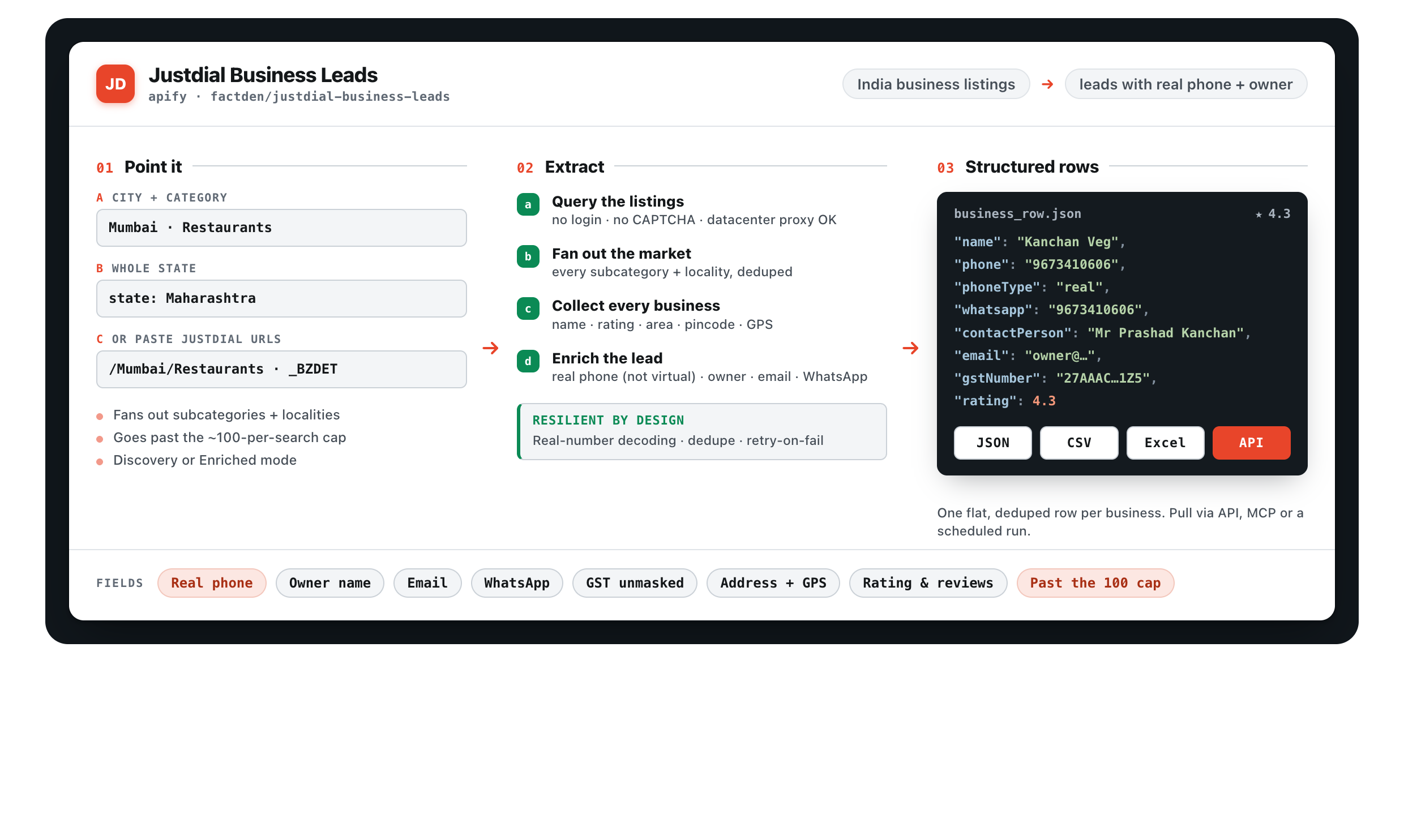
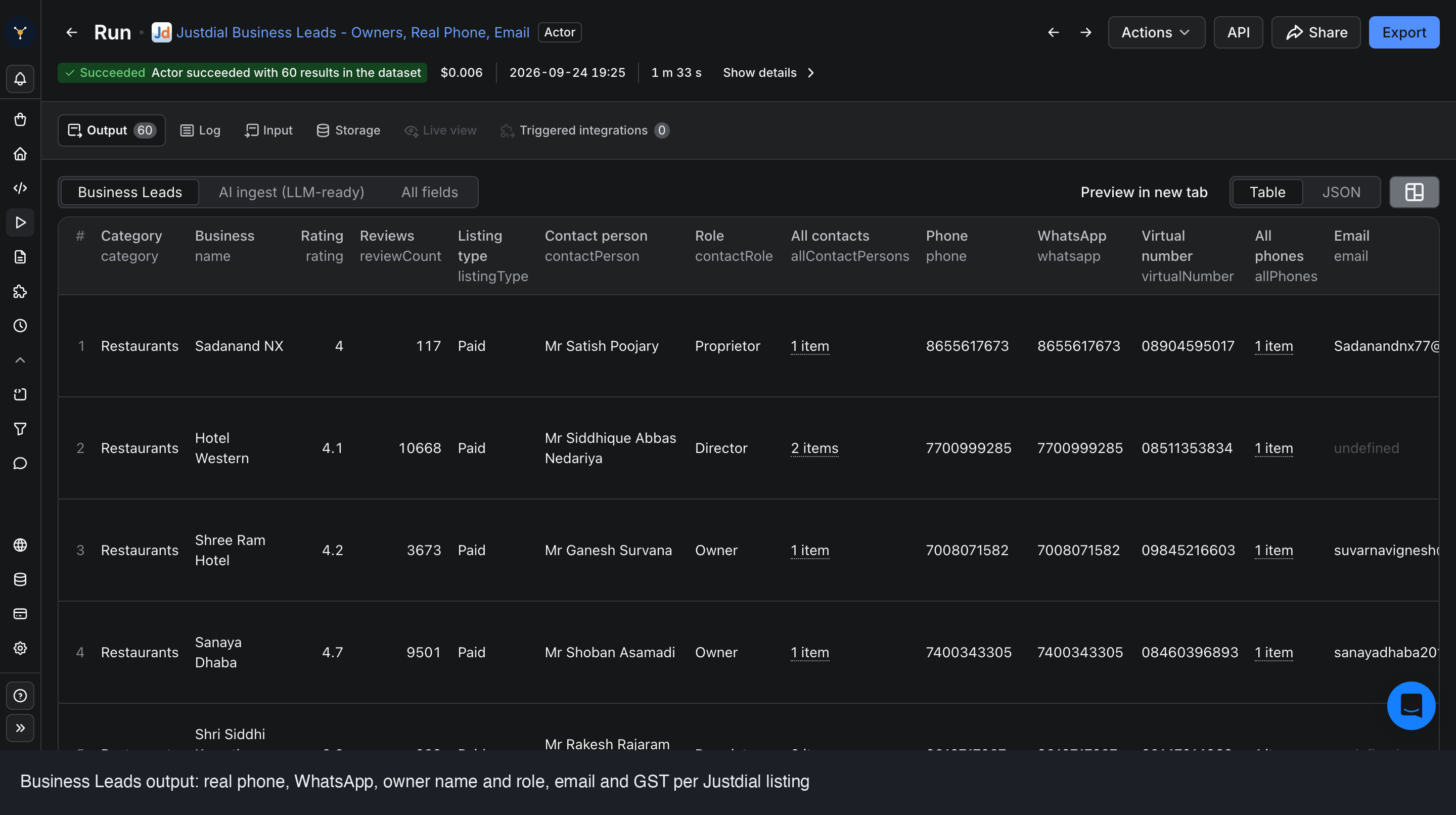
- Listing: business name, category, Free or Paid (advertiser) listing type, full address broken into area, city, and pincode, GPS coordinates, star rating, and exact review count.
- Contacts (enriched mode): the real phone (the advertiser's real mobile behind the virtual number when available), phone type, WhatsApp, the displayed virtual number, email, owner or contact-person name and role, and website.
- GST & firmographics (enriched mode): the full unmasked GSTIN (Justdial masks it on the web page), plus legal name, year established, employee count, and turnover where on file.
It returns every phone, email, and contact a business lists, not just the first, so you never lose the mobile that actually answers.
Why building your own Justdial scraper usually breaks
Plenty of teams start by writing a quick script against Justdial. It tends to fall apart fast:
- The phone is not in the HTML. The real number is loaded behind a separate call and, for advertisers, hidden behind a virtual call-tracking number, so a naive scrape returns the useless masked line.
- Anti-bot friction. Justdial rate-limits and soft-blocks aggressive scraping; naive requests stall or get challenged within a handful of calls.
- The ~100-result wall. A single search shows only about 100 businesses; harvesting a whole city + category means paginating past that limit correctly.
- GST is masked. The web page shows a partial GSTIN; getting the full number takes an extra resolved lookup.
- Maintenance. The site changes. A scraper you build is a scraper you now own forever.
This is why most teams use a maintained extractor instead of rolling their own: you pay for the result, not the upkeep.
The fast way: the FactDen Justdial Business Leads Scraper
The Justdial Business Leads Scraper on the Apify platform returns structured Justdial data with no login, no account, and no API key. Here's the full workflow.
Step 1: Open the actor
Go to the Justdial Business Leads Scraper on Apify and click Try for free. You'll need a free Apify account.
Step 2: Pick cities and categories
Drive the run any of several ways:
- By city or state: pick one or more cities, or a whole state, to cover a region in one run.
- By category: type the business types you want (for example Restaurants, Gyms, Dentists, Plumbers), matched like Justdial's own search box.
- By URL: paste a Justdial category, area, or business URL to scrape exactly that listing.
Step 3: Enable Contact Enrichment (optional) and run
Turn on Contact Enrichment if you need the real phone, email, owner, WhatsApp, website, and GST, then start the run. Leave it off for a cheaper Discovery-only listing map. The actor handles the anti-bot side, the phone decoding, and going past the ~100-result wall for you.
Step 4: Export the data
Download the dataset as JSON, CSV, Excel, or HTML, or pull it through the Apify API into your CRM, calling tool, or WhatsApp pipeline. Every lead also comes as an LLM-ready markdown field for RAG and AI agents.
Tip for lead generation: run Discovery mode first with a city + category to map and count a whole segment cheaply, then re-run the shortlist with Contact Enrichment on. You are charged for exactly one of the two modes per run, never both, so this keeps cost down while you validate a segment.
Keep it fresh: schedule the run daily or weekly to catch newly listed businesses and refresh phone numbers and owners as listings change. A lead list is only worth what it is on the day you dial it.
Want to see the data first? Get a free Justdial leads sample and explore the structure before you run anything.
What does it cost?
Pay-per-result, no subscription. Discovery listings from $2 per 1,000. Enriched leads (real phone, email, owner, WhatsApp, GST) from $10 per 1,000, plus a flat $0.005 per run. You are charged for exactly one of the two modes, chosen by the enrichment toggle, never both. New Apify accounts get about $5 of free credit to test.
Frequently asked questions
- Is it legal to scrape Justdial?
- The actor collects only publicly available Justdial business-listing data, with no login-only content. Business contact details published on a directory are generally public, but how you use them is your responsibility: comply with Justdial's Terms, India's DPDP Act, 2023, TRAI DND rules, and honour do-not-contact requests.
- How much does it cost to scrape Justdial business leads?
- Discovery listings from $2 per 1,000; enriched leads with real phone, email, owner and GST from $10 per 1,000; plus a flat $0.005 per run. You pay for one of the two modes, never both. New accounts get about $5 of free credit.
- Are the phone numbers real or masked?
- Real. The actor returns the number Justdial displays, and for paid advertisers resolves the real underlying mobile instead of the call-tracking virtual number. Both values are returned and a phoneType field tells you which is which.
- Can I search by city, state, and category?
- Yes, by one or more cities or a whole state times one or more categories, or by pasting a Justdial category, area, or business URL.
- Can I export Justdial data to CSV or Excel?
- Yes, datasets export to JSON, CSV, Excel, or HTML, or via the Apify API.
Ready to pull your first dataset? Open the Justdial Business Leads Scraper
Product page: Justdial Business Leads Scraper - fields, pricing & FAQ →